<?xml version="1.0" encoding="utf-8"?><feed xmlns="http://www.w3.org/2005/Atom" ><generator uri="https://jekyllrb.com/" version="4.3.2">Jekyll</generator><link href="https://www.basix.dev/atom.xml" rel="self" type="application/atom+xml" /><link href="https://www.basix.dev/" rel="alternate" type="text/html" /><updated>2026-11-13T12:04:56+01:00</updated><id>https://www.basix.dev/atom.xml</id><title type="html">basix</title><subtitle>Notes on data engineering, software, and the work behind reliable systems by Selver Basic.</subtitle><author><name>Selver Basic</name><email>selver@basix.dev</email></author><entry><title type="html">How do you design migration tests on a live environment?</title><link href="https://www.basix.dev/how-do-you-design-a-migration-tests-in-on-a-live-environment/" rel="alternate" type="text/html" title="How do you design migration tests on a live environment?" /><published>2026-10-14T00:00:00+02:00</published><updated>2026-10-14T00:00:00+02:00</updated><id>https://www.basix.dev/how-do-you-design-a-migration-tests-in-on-a-live-environment</id><content type="html" xml:base="https://www.basix.dev/how-do-you-design-a-migration-tests-in-on-a-live-environment/"><![CDATA[<p>In an environment where timeseries data is the one mostly being consumed and being build upon, how do you design the tests necessary for the migration of such a system? In general, that would not be such a special problem if the target test is not to have the “todays” data as the main reference for a successful migration. So the problem is, that the target is moving every day. If I had understood the problem and the approach to the migration initially, I would not have accepted such a premise. 
The source system does not have a way to fake time, but in the target system we have a way of faking the time. But that is not enough. The timeseries are being backfilled on the source system. That means that data that has been processed as data in the past can change - often.
There are many problems, when trying to test the migration but here are a few we are going to focus on:</p>

<ol>
  <li></li>
</ol>

<h2 id="high-level-overview">High level overview</h2>

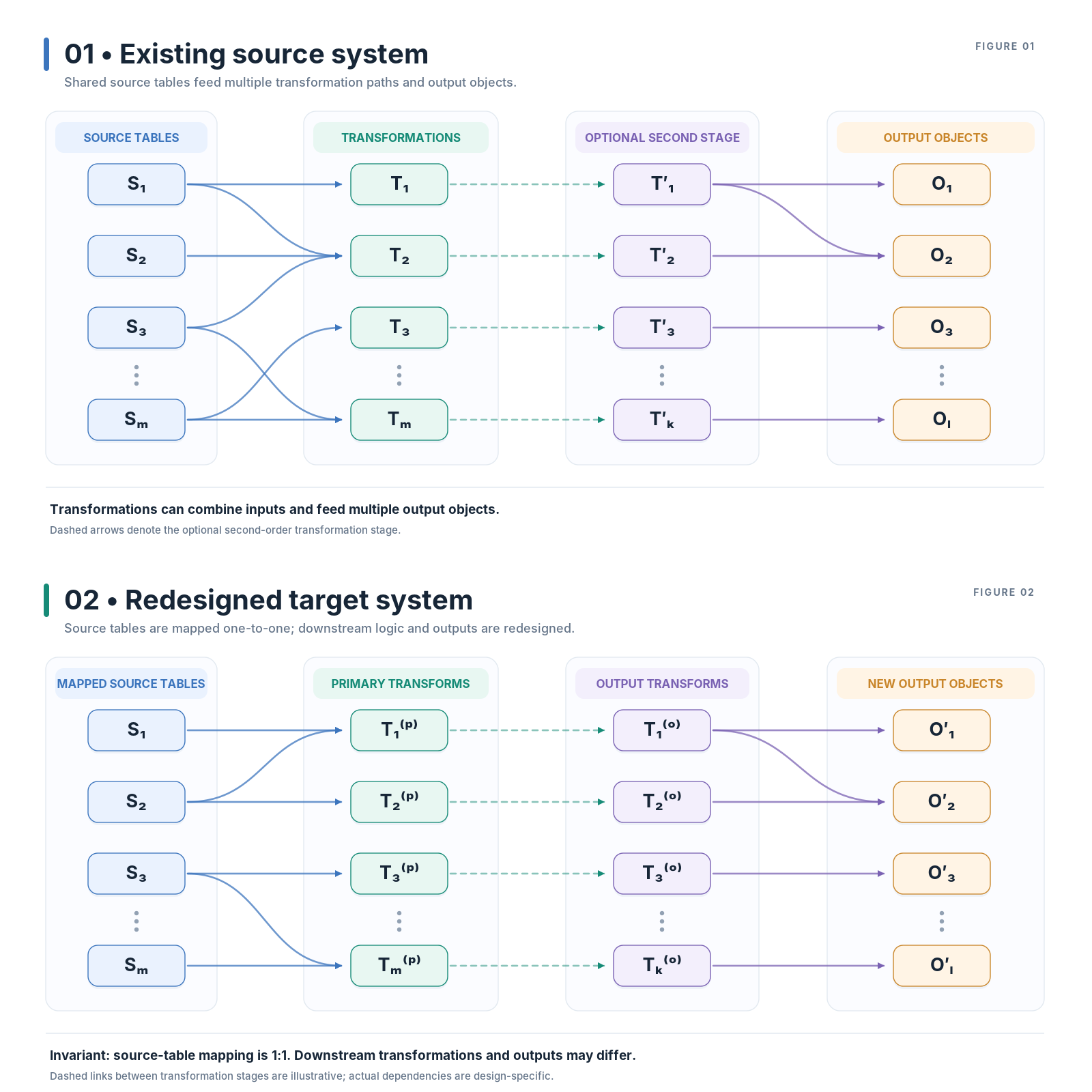
<p><img src="/docs/images/pipeline-architecture-comparison.png" alt="Diagram of the migration test" /></p>]]></content><author><name>Selver Basic</name><email>selver@basix.dev</email></author><summary type="html"><![CDATA[Comparing to a moving target is an antipattern.]]></summary></entry><entry><title type="html">Using private keys in Azure Data Factory</title><link href="https://www.basix.dev/Using-private-keys-in-Azure-Data-Factory/" rel="alternate" type="text/html" title="Using private keys in Azure Data Factory" /><published>2022-11-21T00:00:00+01:00</published><updated>2022-11-21T00:00:00+01:00</updated><id>https://www.basix.dev/Using-private-keys-in-Azure-Data-Factory</id><content type="html" xml:base="https://www.basix.dev/Using-private-keys-in-Azure-Data-Factory/"><![CDATA[<p>We wanted to store a private key file into the azure key-vault in order to use it to connect to a SFTP server.</p>

<p>We have in a `ppk` file and not in any of the other formats accepted by azure (`pem`, `pfx` or `byok`). The azure restrictions will apply when uploading the file manually to key-vault. You can choose to do it via azure cli like this:</p>

<div class="language-sh highlighter-rouge"><div class="highlight"><pre class="highlight"><code>az keyvault secret <span class="nb">set </span>vault-name <span class="si">$(</span>keyVaultName<span class="si">)</span> name <span class="si">$(</span>secretKeyName<span class="si">)</span> <span class="nt">--file</span> <span class="s1">'$(file);
</span></code></pre></div></div>
<p>but this will not do the trick for you. It will upload the file but you will not be able to use it in ADF.</p>

<p>This is a 3 steps process:</p>

<ol>
  <li>Convert the ppk to pem format</li>
  <li>Encode the pem file as base64</li>
  <li>Upload the file with azure cli in 2 steps</li>
</ol>

<h2 id="convert-the-ppk-to-pem-format">Convert the ppk to pem format</h2>

<p>If you are a windows user then get the tool <a href="https://www.puttygen.com/#Download_PuTTYgen_on_Windows">puttygen</a> and load your ppk key file with it. On the selection menu click conversions and convert it to a (private key) openssh key format. Be sure to add the `.pem` extension.
If you are a linux user use the puttygen tool as well (after installing putty-tools), but in the console like this</p>

<p><code class="language-plaintext highlighter-rouge">puttygen privatekey.ppk -O private-openssh -o pemkey.pem</code></p>

<h2 id="encode-the-pem-file-as-base64">Encode the pem file as base64</h2>

<p>The resulting pem file needs to be encoded as base64 in order to be used from ADF. This is a pretty standard encoding algorithm and you can find many tools for windows or linux to do it. For Windows there is the <a href="https://www.microsoft.com/en-us/p/base64-encoder/9nblgggzl3k2?activetab=pivot:overviewtab">base64 encoder</a> from Microsoft and for Linux the `base64` binary is part of the builtin toolbox.</p>

<h2 id="upload-the-file-with-azure-cli-in-2-steps">Upload the file with azure cli in 2 steps</h2>

<p>Now you have the base64 encoded file and you need to add it to the keyvault. Use azure cli like this:</p>
<div class="language-sh highlighter-rouge"><div class="highlight"><pre class="highlight"><code>az keyvault secret <span class="nb">set </span>vault-name <span class="si">$(</span>keyVaultName<span class="si">)</span> name <span class="si">$(</span>secretKeyName<span class="si">)</span> <span class="nt">--file</span> <span class="s1">'$(file);
</span></code></pre></div></div>

<p>Some private keys are encrypted with a a passphrase. You can either upload the passphrase yourself as an additional key (which we did in out case), or you can use the pem upload command from azure keyvault like this:</p>

<p><code class="language-plaintext highlighter-rouge">
sh
az keyvault key import pem-file $(pemFile) vault-name  $(keyVaultName) name $(secretKeyName) pem-passphrase $(passPhrase)</code></p>

<p>Now you can use it in ADF.</p>]]></content><author><name>Selver Basic</name><email>selver@basix.dev</email></author><summary type="html"><![CDATA[We wanted to store a private key file into the azure key-vault in order to use it to connect to a SFTP server.]]></summary></entry><entry><title type="html">Interger ids with spark</title><link href="https://www.basix.dev/Spark-numerical-id-generation/" rel="alternate" type="text/html" title="Interger ids with spark" /><published>2021-07-21T00:00:00+02:00</published><updated>2021-07-21T00:00:00+02:00</updated><id>https://www.basix.dev/Spark-numerical-id-generation</id><content type="html" xml:base="https://www.basix.dev/Spark-numerical-id-generation/"><![CDATA[<p>There is a bunch of different ways of generating numeric values in spark that can serve the purpose of unique identifiers.
Here are some functions to utilize to accomplish that:</p>
<ol>
  <li><code class="language-plaintext highlighter-rouge">row_number()</code></li>
  <li><code class="language-plaintext highlighter-rouge">monotonically_increasing_id()</code></li>
  <li><code class="language-plaintext highlighter-rouge">rdd.zipWithIndex()</code></li>
  <li>hash functions</li>
</ol>

<p>They all have their pros and cons. What you choose depends on one or both points below:</p>

<ol>
  <li>whether it really gives you the uniqueness you hope to get</li>
  <li>whether you like the properties of the ids you end up having</li>
</ol>

<p>One would think that the first point is actually no point at all, since we kinda have an understanding what uniqueness is and it is easy to test weather we have achieved it or not. But it is slightly more complex than that. It goes back to the hashing collisions and the size of table you are operating on. So, let’s start with that right away.</p>

<h2 id="hash-functions">Hash functions</h2>

<p>There are many, many, many hash functions and you could theoretically use any of the if you had the implementation and register it as an <code class="language-plaintext highlighter-rouge">udf</code>. We are looking only for functions that will give us and integer as result and for those that are already in the spark library. This changes as new versions of the spark api come out and we are now at version <code class="language-plaintext highlighter-rouge">3.1.2</code>.</p>

<p>Let’s list a few of the hash functions available for free in spark:</p>

<ul>
  <li><code class="language-plaintext highlighter-rouge">hash</code></li>
  <li><code class="language-plaintext highlighter-rouge">xxhash64</code></li>
  <li><code class="language-plaintext highlighter-rouge">crc32</code></li>
  <li><code class="language-plaintext highlighter-rouge">sha</code>, <code class="language-plaintext highlighter-rouge">sha1</code> and <code class="language-plaintext highlighter-rouge">sha2</code></li>
  <li><code class="language-plaintext highlighter-rouge">md5</code></li>
</ul>

<p>Now looking at it, I wish the function <code class="language-plaintext highlighter-rouge">xxhash64</code> had been available in spark 2.X.X since that would have been the weapon of choice on the solution I was working on a few years back. The past is the past and I wanna explain with what restriction you have to fight in choosing the right hash function.</p>

<h2 id="row-number">Row Number</h2>

<p>To be precise, this is the <code class="language-plaintext highlighter-rouge">pyspark.sql.functions.row_number</code><sup id="fnref:1" role="doc-noteref"><a href="#fn:1" class="footnote" rel="footnote">1</a></sup> <strong>window</strong> function which acts on a dataframe. Window functions are functions comming from the sql world which act on a smaller set of rows (a window of rows) within a bigger set of rows being processed. Let me explain.</p>

<p>If you provide <code class="language-plaintext highlighter-rouge">null</code> as partition (in sql you can omit it completely), it will act on a single row as the window and provide you with a nice sequence starting from 1.</p>

<div class="language-sql highlighter-rouge"><div class="highlight"><pre class="highlight"><code><span class="k">SELECT</span> <span class="n">row_number</span><span class="p">()</span> <span class="n">OVER</span><span class="p">(</span><span class="k">ORDER</span> <span class="k">BY</span> <span class="k">NULL</span><span class="p">)</span> <span class="k">as</span> <span class="n">rownum</span><span class="p">,</span> <span class="o">*</span> <span class="k">from</span> <span class="p">[</span><span class="n">db</span><span class="p">.]</span><span class="n">tablename</span> 
</code></pre></div></div>

<h2 id="monothonically-increasing-id">Monothonically increasing id</h2>

<h2 id="rdds-zipwithindex">Rdds <code class="language-plaintext highlighter-rouge">ZipWithIndex</code></h2>

<div class="footnotes" role="doc-endnotes">
  <ol>
    <li id="fn:1" role="doc-endnote">
      <p><a href="https://spark.apache.org/docs/3.1.2/api/python/reference/api/pyspark.sql.functions.row_number.html?highlight=row_number#pyspark.sql.functions.row_number">row_number</a> <a href="#fnref:1" class="reversefootnote" role="doc-backlink">&#8617;</a></p>
    </li>
  </ol>
</div>]]></content><author><name>Selver Basic</name><email>selver@basix.dev</email></author><summary type="html"><![CDATA[There is a bunch of different ways of generating numeric values in spark that can serve the purpose of unique identifiers. Here are some functions to utilize to accomplish that: row_number() monotonically_increasing_id() rdd.zipWithIndex() hash functions]]></summary></entry></feed>